This is one of those things I always seems to forget how to do (maybe I’m not doing it often enough :)), even though it is one of the simplest things there is in Crystal Reports:
- Open your main report
- Go to Edit->Subreport Links…
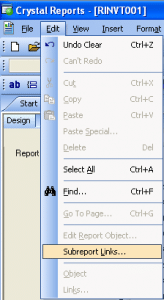
Subreport Links...
- Now just move the parameters in the main report (left side) to the subreport (right side)
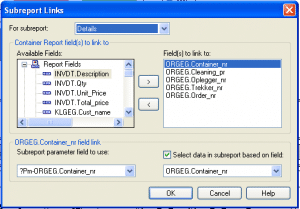
Subreport links window
- Click “OK” and your done!

Thank You very much for this usefull Tip
Thank you so much ….. 😎
😛 – I have just worked it out after a few hours !! – thank you
Thank you saved me a lot of frustration on a report with 5 subreports