This is such a strange problem that I just have to write it down for future reference.
Involved systems:
* One Ubuntu 14.04.2 LTS on AWS (Amazon Web Services)
* One MacBook Pro 2010 with 10.7.5 with iTerm 2.1.1
* One MacBook Pro 2015 with 10.10.3 with iTerm 2.1.1
* One Play framework 2.3 application
Problem description:
After starting the Play application with the MacBook that has the 10.10.3 version all files that were written to disk had all non-ascii characters shown as ??. When starting the Play application with the old computer (10.7.5) these characters where displayed correctly.
After quite a lot of trial-and-error I found that the command ‘locale’ on the remote AWS server complained about:
“locale: Cannot set LC_CTYPE to default locale: No such file or directory”
“locale: Cannot set LC_ALL to default locale: No such file or directory”
when using the newer computer but not with the old
Solution:
The ‘locale’ command error lead me to the following solution in iTerm:
Untick the Terminal option “Set locale variables automaticly” in Preference
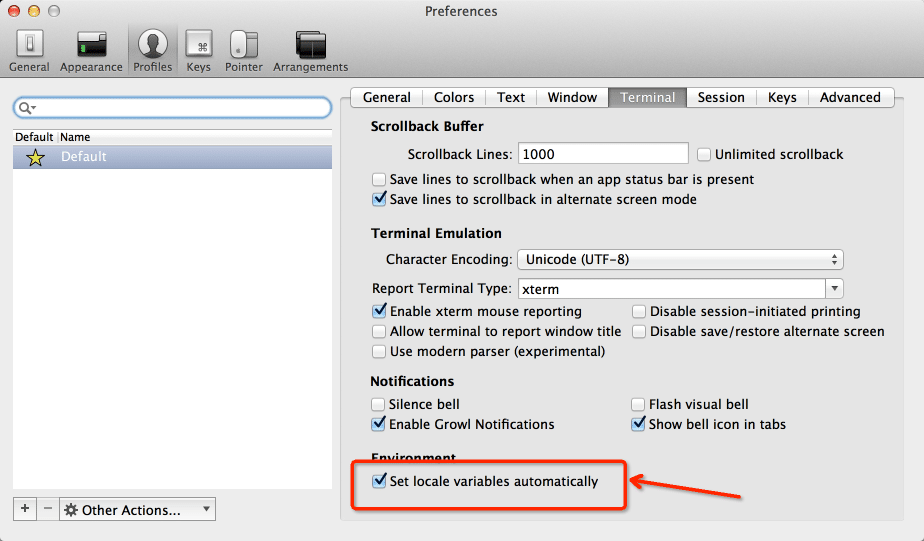
This option is AFAIK default on in iTerm
After this was done the ‘locale’ error was gone and all files had the correct charset

0 Comments.