A simple JUnit test for when you just can’t remember the Mule JUnit testing syntax 😉
Mule flow
A Mule flow that takes a username as input and concatenates it with a “Hello”. The request is done by a GET call:
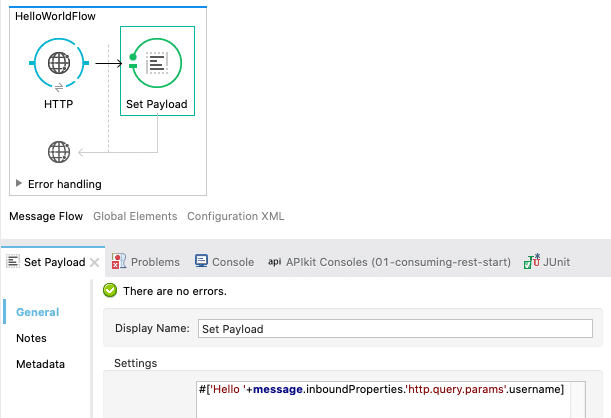
Flow code
    <http:listener-config
       name="HTTP_Listener_Configuration"
       host="0.0.0.0"
       port="8081"
       doc:name="HTTP Listener Configuration">

        <http:listener
           config-ref="HTTP_Listener_Configuration"
           path="/test"
           doc:name="HTTP">
        <set-payload
           value="#['Hello '+message.inboundProperties.'http.query.params'.username]"
           doc:name="Set Payload">
Java test code:
import org.junit.Test;
import org.mule.DefaultMuleMessage;
import org.mule.api.MuleMessage;
import org.mule.api.client.MuleClient;
import org.mule.tck.junit4.FunctionalTestCase;

import junit.framework.Assert;

public class MyTests extends FunctionalTestCase {

	@Test
	public void testMyFlow() throws Exception {
        // Get the Mule Context
		MuleClient muleClient = muleContext.getClient();

        // Create an empty test Mule message
		DefaultMuleMessage message =
                        new DefaultMuleMessage(null, muleContext);

        // Make a call to the tested web service
		MuleMessage responseMessage = muleClient.send(
                       "http://localhost:8081/test?username=Niklas",
                       message
                    );

        // Get response as a string
		String responsePayload = responseMessage.getPayloadAsString();

        // Assert response
		Assert.assertEquals("Hello Niklas", responsePayload);

	}

	@Override
	protected String[] getConfigFiles() {
         // Path to the Mule configuration file that is being tested
		return new String[]{"src/main/app/helloworld.xml"};
	}

}
Tested on OSX 10.15.7, Mule 3.9.4, and JUnit 4.13

0 Comments.